.svg)

.avif)
A robust automated inventory management system is as crucial to customer experience as the quality of the product itself. If a high-quality product falls prey to logistical failures, it can still hamper a customer’s experience.
If you’re in the retail industry, the chances are that you might have come across the acronym ‘SKU,’ popularly pronounced as ‘skew.’
Now you must be wondering, what even is this?
Well, don’t fret!
We are here to break it down to you.
In this guide, you’ll learn what SKUs really are, how to create one and how to use them to keep your inventory organized and your customers happy.
What Is an SKU (Stock Keeping Unit)?
An SKU (Stock Keeping Unit) is a unique code you assign to each product (and its variants) in your inventory. Think of it as your product’s internal identity—something that helps you quickly recognize what it is, without relying on long product names.

For example, instead of searching for “Blue Cotton T-Shirt Size Medium”, a well-structured SKU like TS-BLU-M tells you everything at a glance.
Unlike barcodes or UPCs (which are standardized globally), SKUs are completely customizable. You create them based on how your business operates, what details matter most to you, and how you want to organize your inventory.
At its core, an SKU is not just a code, it’s the foundation of how you track, manage, and scale your inventory.
Why SKUs Matter in Inventory Management
If you’re managing more than a handful of products, SKUs quickly become non-negotiable.
They bring structure to what would otherwise be chaos.
With a solid SKU system, you can:
- Identify products instantly without confusion
- Track stock levels accurately across locations
- Reduce picking and packing errors
- Analyze sales performance at a granular level
More importantly, SKUs help you move faster. Whether you're checking stock, fulfilling orders, or planning reorders, you don’t waste time guessing.
Without SKUs, inventory management becomes reactive. With SKUs, it becomes predictable and scalable.
How to Create an Effective SKU System
Creating SKUs isn’t about randomly assigning codes, it’s about building a system that works long-term.
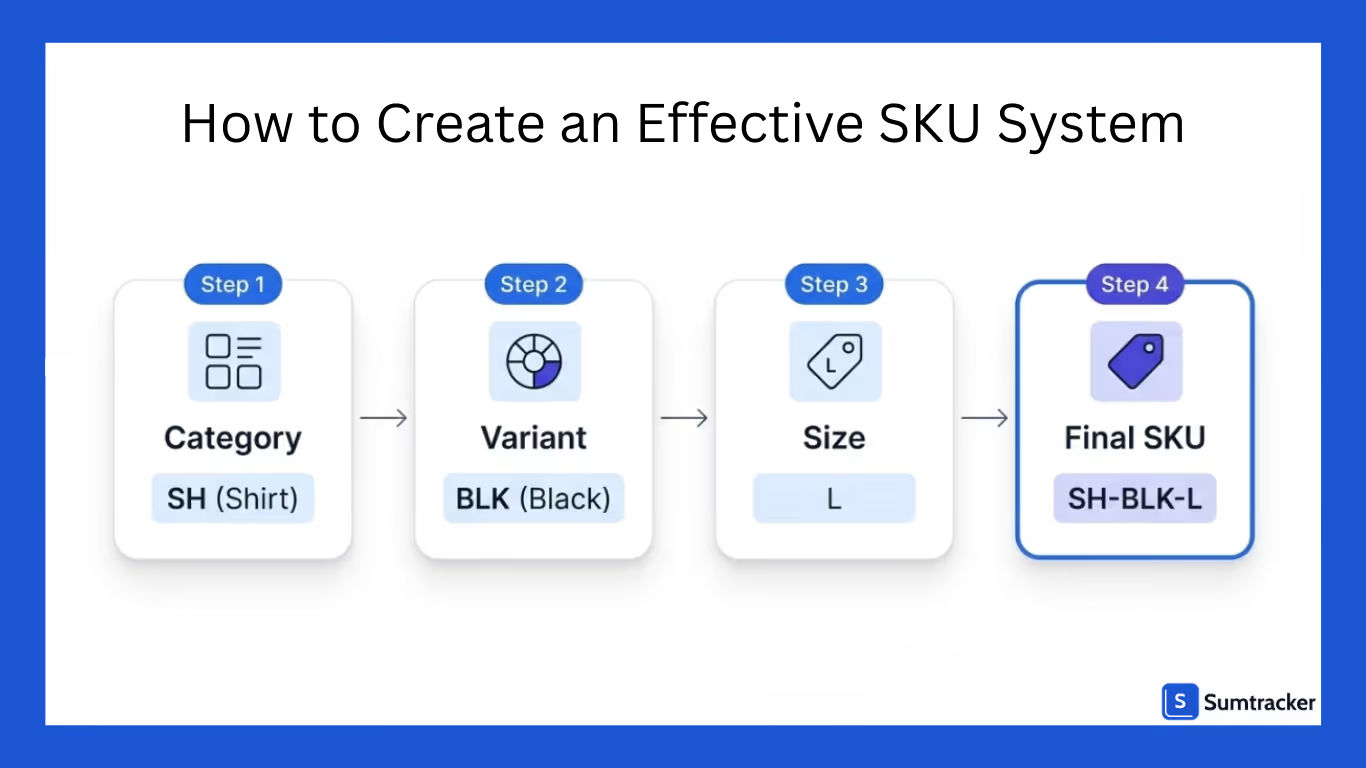
Start by deciding what information matters most:
- Product type
- Brand or category
- Variant (size, color, material)
- Location or channel (optional)
Then structure your SKU in a consistent format. For example:
[Category]-[Color]-[Size] → SH-BLK-L
Keep it:
- Short enough to read quickly
- Meaningful enough to understand
- Consistent across all products
Avoid overcomplicating things. The goal is clarity, not perfection.
Also, think ahead. Your SKU system should still work when you have 10,000 products—not just 10.
SKU Naming Best Practices (With Examples)
A good SKU should be readable, predictable, and scalable.
Here are some practical best practices:
1. Use meaningful abbreviations
Instead of random codes, use logic:
- BLK = Black
- MED = Medium
- WMN = Women
Example:
WMN-TS-BLK-MED → Women’s Black T-Shirt (Medium)
2. Keep it consistent
Don’t mix formats like:
- TS-BLK-M
- TSHIRT-BLACK-MEDIUM
Pick one structure and stick to it.
3. Avoid special characters and spaces
Stick to letters, numbers, and hyphens. This avoids issues across platforms like Shopify or Amazon.
4. Don’t make it too long
If your SKU looks like a sentence, it’s not doing its job.
5. Build for humans, not just systems
Yes, software reads SKUs but your team uses them daily. Make them intuitive.
Common SKU Mistakes to Avoid
Most SKU issues don’t show up immediately, they become painful as you scale.

Here are some common mistakes to watch out for:
1. Inconsistent formats
Different naming styles create confusion and errors.
2. Overcomplicating SKUs
Adding too many details makes them hard to read and use.
3. Using random or auto-generated codes
These might work short-term, but they’re useless for humans.
4. Duplicate SKUs
This can completely break your inventory tracking.
5. Not planning for growth
What works for 50 SKUs may fail at 5,000.
How SKUs Help with Inventory Tracking and Reporting
SKUs are the backbone of accurate inventory tracking.
Every time a product is sold, restocked, or transferred, it’s tracked through its SKU. This ensures that:
- Stock levels stay accurate
- Orders are fulfilled correctly
- Reports reflect real data
On the reporting side, SKUs unlock deeper insights:
- Which variants are selling the most?
- Which products are slow-moving?
- Where are you overstocked or understocked?
Without SKUs, all of this becomes guesswork.
With SKUs, you can make data-driven decisions whether it’s restocking faster-moving items or clearing out dead stock.
Using SKUs for Multi-Channel Selling (Shopify, Amazon, eBay)
When you’re selling on multiple platforms, SKUs become even more critical.
Each platform (Shopify, Amazon, eBay) might display products differently but your SKU acts as the common link between them.

This allows you to:
- Sync inventory across channels
- Avoid overselling
- Maintain consistent product data
For example, if the same SKU sells on Shopify and Amazon, your inventory should update in real time across both.
Without a unified SKU system, you risk:
- Selling out-of-stock products
- Mismatched listings
- Inventory discrepancies
In multi-channel selling, SKUs are what keep everything connected behind the scenes.
How Inventory Software Simplifies SKU Management
Managing SKUs manually works until it doesn’t.
As your catalog grows, handling SKUs across multiple channels, locations, and orders becomes complex. This is where inventory software like Sumtracker makes a real difference.
Instead of juggling spreadsheets or fixing sync issues, you get a centralized system that:
- Keeps SKUs consistent across Shopify, Amazon, eBay, and more
- Syncs inventory in real time across all channels
- Tracks stock levels accurately for every SKU
- Provides clear reports based on SKU-level performance
- Helps with restocking decisions using reliable data
More importantly, it removes manual errors.
You don’t have to worry about duplicate SKUs, mismatched inventory, or delayed updates. Everything stays aligned automatically.
If SKUs are the backbone of inventory, tools like Sumtracker are what keep that backbone strong especially as your business scales.
FAQS
What is an SKU, and why is it important?
An SKU (Stock Keeping Unit) is a unique identifier assigned to each product. It helps businesses track inventory, streamline sales, and make data-driven restocking decisions across sales channels.
How do I create an effective SKU naming convention?
Start with product category codes, then add attributes like color or size. For example: TSH-BLK-M for a medium black t-shirt. Avoid special characters and keep it under 12 characters.
Can I use the same SKU across different platforms like Amazon and Shopify?
Yes, and you should! Using consistent SKUs across platforms ensures accurate inventory tracking, simplifies fulfillment, and reduces the risk of overselling or stockouts.
What’s the difference between an SKU and a UPC?
SKUs are internal codes you create for managing stock. UPCs (Universal Product Codes) are standard barcodes used globally for identifying products at the point of sale.
How does Sumtracker help simplify SKU management?
Sumtracker links the same SKU across all your listings, auto-syncs inventory, triggers low-stock alerts, and provides real-time, SKU-level reports—all from one clean dashboard.
Conclusion
Try Sumtracker

Successful case studies
Related Articles
Tool and strategies modern teams need to help their companies grow.
.avif)
.avif)
.png)
Ready to Simplify Your Inventory Management?
Join hundreds of e-commerce merchants who rely on Sumtracker to save time, eliminate errors, and grow their business.